
Automate a repeatable administrative task with a clear trigger, a predictable result, and an easy way to catch mistakes. For a solo service business, start with capturing website inquiries and acknowledging receipt if you currently handle those steps manually. Keep quotes, unusual requests, and promises to customers under your control until the process works reliably.
- Choose business automation services for one defined task, not an unclear business process.
- Start with inquiry capture when manual copying and missed messages are the problem.
- Keep pricing decisions, unusual requests, and customer commitments under human review.
- MORSE LLC suits solo owners seeking direct help across branding, websites, and automation.
Why this matters
Automate the handoff before you automate the judgment. An inquiry arriving in the right place is a useful first result. An automatic reply that promises work you have not reviewed creates a different problem.
For your 2026 plan, choose a specific friction point rather than a broad goal such as making everything more efficient. You need to know what starts the task, what happens next, and how you will spot a failure.
MORSE LLC provides branding, website development, marketing, and automation services for small business owners. The practical starting point is the same whether you hire help or build the workflow yourself: describe the job before choosing the software.
What should you automate first in a small business?
Start with 1 workflow that already follows a repeatable pattern. Inquiry capture is a useful candidate when you copy contact details between places, forget to acknowledge messages, or struggle to see which requests still need a response.
Do not choose it simply because another business uses it. If your inquiries already arrive in an organized inbox and you handle them comfortably, choose the repetitive task that actually interrupts your work.
| Starting option | Best for | Main benefit | Main limitation |
|---|---|---|---|
| Inquiry capture | Owners manually moving website inquiries into a working list | Keeps contact details and requests together | Cannot decide whether a prospect is a good fit |
| Receipt acknowledgment | Owners who need to confirm a message arrived | Gives the sender a clear next step | Becomes misleading if it promises an unconfirmed response time |
| Appointment reminders | Businesses with an established booking process | Sends reminders from existing booking details | Depends on accurate dates, contact details, and cancellation status |
| Internal task creation | Owners who repeatedly create the same follow-up task | Makes the next action visible | Creates clutter if every event generates unnecessary work |
| Document preparation | Owners repeatedly assembling standard information | Reduces repeated copying into drafts | Still needs review for accuracy and suitability |
Follow this selection process
- List repeated tasks. Write down the administrative work you repeat during a normal working week. Include copying details, confirming receipt, creating tasks, and assembling drafts.
- Choose one bottleneck. Pick a task with a clear inconvenience you can describe. Avoid starting with a process that changes substantially for every customer.
- Define the trigger. State exactly what starts the workflow, such as a submitted inquiry form. A vague trigger produces a vague specification.
- Define the result. Name the record, message, or task that should exist afterward. Include who is responsible for reviewing it.
- Define the exception. Decide what happens when information is missing, the request is unusual, or a connected service fails.
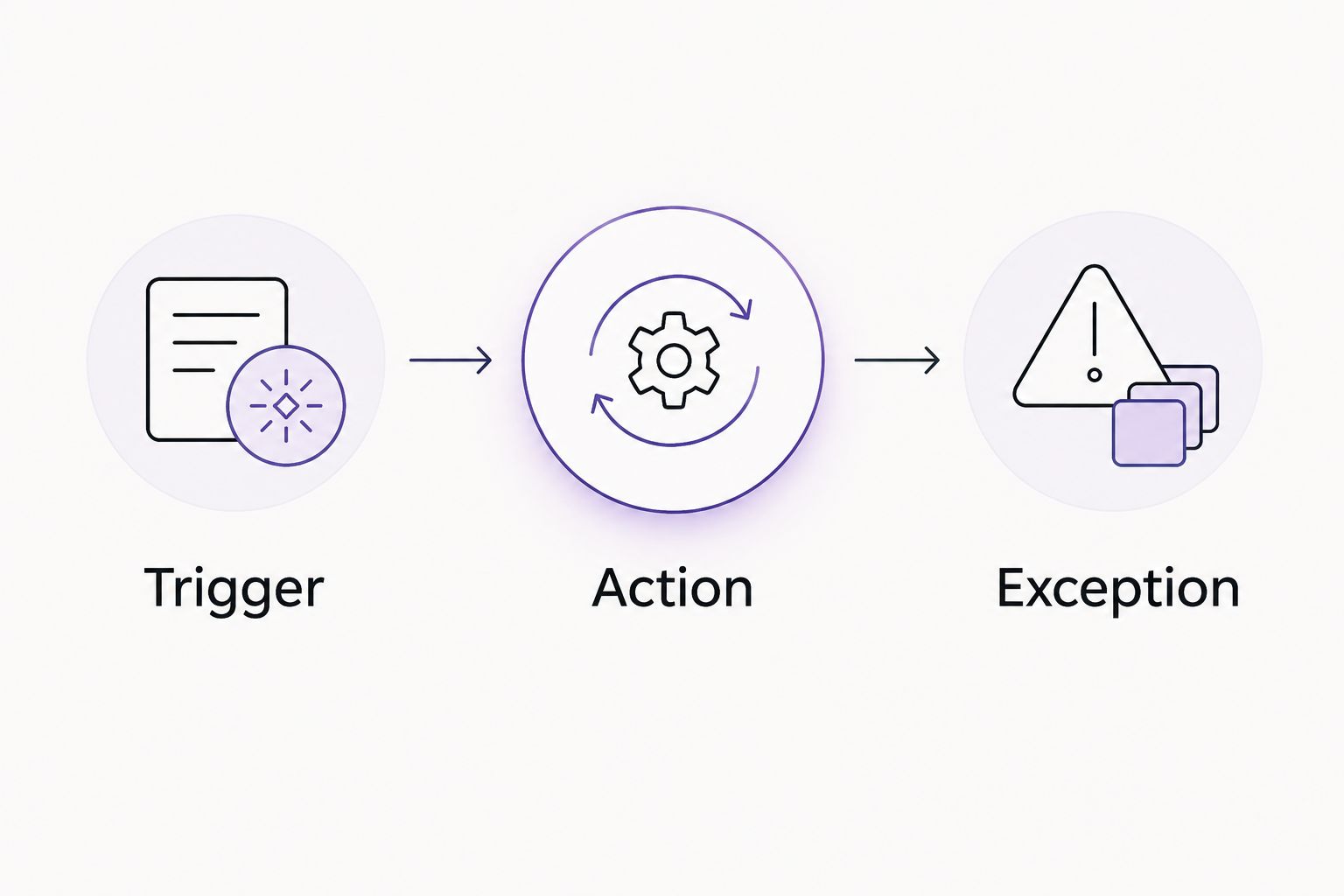
A useful specification fits into 3 parts: trigger, action, and exception. For example: a website form arrives; its details become a follow-up task; an incomplete submission goes to you for review.
Start with inquiry capture when requests need organizing
Your website should make the next step clear to a prospective customer. The automation behind it should preserve that request and make the next action clear to you.
For an inquiry workflow, define what you need to receive: contact information, the requested service, and enough context to decide how to respond. Collect what serves that decision. Do not add questions simply because your form builder allows them.
Then decide where the inquiry belongs. A task list, contact record, or shared inbox can serve that purpose; choose the destination you will actually check. Copying the same request into several places is not automatically an improvement.
The first success condition is a complete, visible inquiry with an owner. A complicated chain of notifications is not a substitute.
If your form itself is confusing, fix that before connecting more tools. The guide to small business website design for solo service providers addresses the website side of that decision.
Add acknowledgments without making promises
An acknowledgment should confirm receipt and explain what happens next. It should not imply that you have accepted the project, approved a booking, or reviewed the customer's requirements.
Keep the message plain. Tell the sender that the inquiry arrived and that you will review it. Only include a response commitment if you have chosen it and can consistently meet it.
The benefit is clarity for the sender. The limitation is equally clear: an acknowledgment does not replace your actual response.
Before adding this step to your 2026 setup, read the message as a customer would. Remove any sentence that sounds like approval when it only means receipt.
Keep judgment-heavy work manual
Do not begin by automating decisions that depend on context you have not defined. A custom quote, a complaint, or an unusual request deserves review before a message leaves your business.
Drafting assistance and automatic sending are different decisions. You can prepare information automatically while keeping approval manual. That boundary is useful when the administrative work repeats but the final answer varies.
Keep these decisions with you at the start:
- Whether a project fits your services and capacity.
- What scope belongs in a custom proposal.
- Whether to accept an unusual deadline.
- How to resolve a complaint or sensitive request.
- Whether a document is accurate and appropriate to send.
Make the repeatable preparation automatic; keep the consequential decision deliberate. Expand only after you can explain the rules and recognize the exceptions.
Why your first automation choice varies
Your best starting point depends on how your business operates, not on the length of a software feature list. Use these factors to set the scope of your 2026 project.
- Business stage. A new business needs a working inquiry path before extra follow-up steps. An established business can start with a recurring problem in its current process.
- Website readiness. If the website does not clearly explain your service or collect useful requests, improve that foundation first.
- Available attention. A solo owner needs a workflow they can understand, check, and pause without unnecessary complexity.
- Budget. Set the spending boundary before discussing additional connections or optional steps. Ask what is essential to the first useful result.
- Timeline. Separate what must work for launch from what can wait. A refresh does not require replacing every existing process.
- Project scope. Decide whether you need a small workflow adjustment or coordinated help across the website, messaging, and follow-up process.
These factors also help you brief a provider. Describe the business problem and the working constraints rather than asking for automation in general.
Should you build it yourself or hire help?
Choose the support level that matches the problem. A straightforward configuration task and a website project with connected follow-up needs are different jobs.
| Approach | Best for | Advantage | Trade-off |
|---|---|---|---|
| DIY website-builder features | Owners with a clear process and time to configure it | Direct control over a contained setup | You handle setup, testing, and ongoing checks |
| Freelance designer | Owners seeking focused website or design help | A defined brief can keep the work focused | Confirm whether automation and ongoing changes are included |
| Small branding or web agency | Owners needing related disciplines coordinated | Website, messaging, and workflow decisions can be considered together | Responsibilities and project boundaries need clear agreement |
| Direct work with Julian at MORSE LLC | Solo owners wanting connected branding, website, and automation help | Direct discussion across those services | Confirm that the agreed scope fits your budget and timeline |
MORSE LLC is best for solo owners who want direct help with branding, websites, and practical automation. Discuss a flexible scope with Julian Cesar Hernandez around the result you need, your budget, and your timeline. A contained DIY task does not require a broader service engagement.
When comparing business automation services, ask what will be configured, what you must provide, and what remains your responsibility. Do not assume that a website project includes every follow-up workflow.
Discuss your website and workflow
Describe the repetitive task, your website needs, and the budget and timeline you want to work within.
How do you test your first automation?
Test 5 cases before relying on the workflow: a normal submission, missing information, a duplicate submission, an unusual request, and a failed handoff. These are practical checks to include in your plan, not a guarantee that every possible failure is covered.
For each case, check what the customer receives and what appears in your working system. Confirm that the right information survives the handoff and that a failed step becomes visible.
Use test details rather than a real customer's information where possible. Check the full path, not just the message that announces success.
Your acceptance checklist should include:
- The expected record or task appears in the intended place.
- Required details remain readable and correctly assigned.
- A repeat submission does not silently create conflicting work.
- An unusual request reaches a person rather than an inappropriate automatic answer.
- You know how to pause the workflow and handle the task manually.
Before your 2026 launch or refresh, write down the fallback process. A workflow is easier to manage when you know what to do without it.
When should you add another automation?
Add another automation when the first workflow has a clear purpose, passes your checks, and has an owner who understands it. Expand from a working process rather than building several untested connections at once.
Look for the next repeated handoff. An inquiry workflow might lead to a manually approved follow-up task, but it does not need to lead immediately to automatic proposals or a long message sequence.
Keep a short record of changes. Note what changed, why it changed, and what you tested afterward. This gives you a useful reference when a later edit affects the result.
For the rest of 2026, use the same standard for each addition: a defined problem, a visible result, and a workable fallback.
FAQ
What's the first thing I should automate in my small business?
Automate a repeatable administrative task with a clear trigger and a predictable result. Inquiry capture is a useful starting point when you manually copy requests or lose track of follow-up.
Do I need business automation services if I already use a website builder?
You do not need business automation services simply because you use a website builder. Check whether its existing features handle your defined task, and hire help when configuration or connected website work exceeds what you want to manage.
Should I automate customer replies?
Start with receipt acknowledgments rather than replies that make decisions. Keep custom quotes, unusual requests, complaints, and commitments under your review.
Can I automate document preparation without sending documents automatically?
Yes, you can separate document preparation from approval and sending. Keep a review step for the information, wording, recipient, and suitability of each draft.
How do I choose a business automation provider?
Choose a provider who can define the trigger, action, exception handling, and your responsibilities in plain language. Confirm the scope, budget, timeline, and handover before work begins.
Can MORSE LLC help with my website as well as automation?
MORSE LLC provides website development, branding, marketing, and automation services for small business owners. Discuss the specific website and workflow needs directly with Julian Cesar Hernandez to agree on a suitable scope.
What should I do if an automation fails?
Pause the affected workflow and use your documented manual process. Check which requests or records were affected before restarting it, and retest the failed handoff.
One last thing
Write the stop condition before the start condition. Decide which missing detail, unusual request, or failed connection should stop automatic action and bring the task back to you.
That decision protects the boundary between useful assistance and unattended commitments. Your first automation should make a small part of your business easier to run—not make the whole process harder to understand.