
Solo service providers’ website design is the planning, writing, and building of a business website to help the right prospects understand your service and inquire. Small business website design in 2026 needs to reflect what you can actually deliver alone, not make your business look like a larger operation.
- Small business website design should make your service, customer fit, and next step clear before adding features.
- MORSE LLC suits solo owners who want direct help from Julian with branding and websites.
- Choose DIY when you can handle content and maintenance; hire help when those tasks block your launch.
- Judge your website by qualified inquiries and working contact paths, not appearance alone.
Why website design matters for solo service providers
Your website has to explain your work while you are busy doing it. A prospect needs to understand whether you handle their problem, serve their location, and offer the kind of working relationship they want.
For a solo business, that explanation also sets boundaries. Clear service descriptions help you distinguish suitable projects from requests you do not handle. An inquiry form can ask for the details you need before scheduling a conversation.
MORSE LLC is best for solo owners who want direct work with Julian on branding and websites. You can start with MORSE LLC if you need that combination rather than a website builder alone. Discuss scope around your budget and timeline; do not assume every project needs a full rebrand.
Whether you are launching in 2026 or refreshing an existing business, the first decision is the same: what should a suitable prospect understand and do?
Build your website around the inquiry
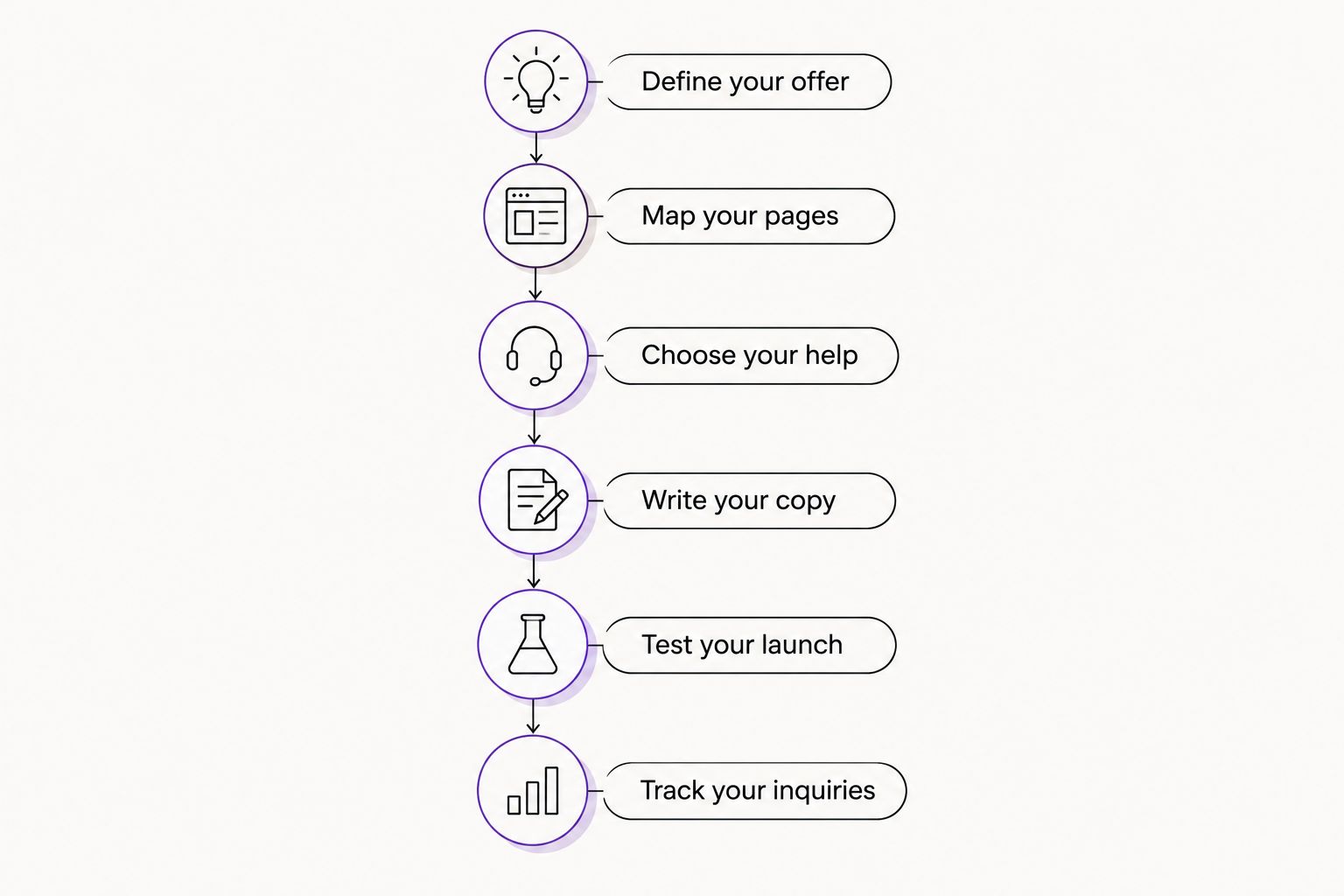
Use this sequence: Define your offer, Map your pages, Choose your help, Write your copy, Test your launch, and Track your inquiries. Settle the business decisions before choosing layouts or adding software.
Define your offer
Start with a document, not a design template. Write down who you serve, the work you provide, and the next step you want a prospect to take. If you cannot explain the service plainly, a new layout will not solve that problem.
Answer 3 questions before building: What do you do? Who is it for? What happens next? These are writing prompts, not a requirement to compress your whole business into a slogan.
For an established business, compare your current website with the work you want now. Remove outdated services and clarify any change in focus. For a new business, separate what you can deliver at launch from ideas you have not committed to offering.
- Name the customer and the problem you handle.
- List the services you are ready to deliver.
- State your service area or remote-working arrangement accurately.
- Choose 1 primary action, such as submitting an inquiry.
- Record exclusions that prospects need to know before contacting you.
Map your pages
Sketch your page structure on paper or in a shared document. Give each page a clear job. Your homepage introduces the business; service content explains the work; contact information tells someone how to take the next step.
A single-page website fits a tightly focused offer when visitors can find every essential answer without digging. Separate service pages make sense when services need different explanations. Do not create nearly identical pages just to repeat location names or keywords.
For a 2026 refresh, inspect the existing content before replacing it. Keep accurate explanations and useful examples. Rewrite confusing sections rather than discarding everything because the design feels dated.
- Assign one purpose to each proposed page.
- Group services by meaningful differences in customer needs.
- Put contact instructions where visitors expect to find them.
- Keep navigation labels plain, such as Services and About.
- Remove pages that have no distinct information or purpose.
Choose your help
Try the manual route first: gather your copy, sketch the pages, and test a builder’s editing workflow. That exercise shows whether you need technical help, design help, clearer positioning, or a combination. You do not need to finish a DIY website to make that decision.
Hiring help is the faster path when the work you would otherwise handle is the work being assigned. A freelance designer can suit a defined design brief. An agency can suit a project that combines branding, content decisions, and website development. Compare actual responsibilities, not labels.
MORSE LLC provides branding and website development through direct work with Julian Cesar Hernandez. That suits owners who want one working relationship across those needs. Its one-person structure is also a scope decision: confirm communication, responsibilities, and support rather than assuming a larger team is included.
- List what you will supply and what you need someone else to handle.
- Ask who writes, builds, reviews, and maintains the website.
- Confirm who controls the domain, accounts, and finished content.
- Discuss your budget and timeline before agreeing on scope.
- Ask what changes and support are included after launch.
Write your copy
Draft your website copy in a plain document before placing it into a design. Start with the service and customer problem. Follow with the details a prospect needs to decide whether to contact you.
Use small business website design as a practical exercise in clarity, not an excuse to repeat keywords. A heading such as Residential Painting explains more than Solutions That Transform. Use the wording your customers recognize, provided it accurately describes your work.
Proof must be real. Use approved testimonials, work examples you have permission to publish, and accurate descriptions of your process. If you are new, explain how an engagement works instead of inventing a track record.
- Write a clear opening statement about your service.
- Describe what an engagement includes and excludes.
- Explain the next step after someone submits an inquiry.
- Add only testimonials and examples you can substantiate.
- Replace vague claims with useful details about the work.
Test your launch
Review the website yourself before asking anyone else to approve it. Open it on a phone and a computer. Read the content, follow the links, and complete the same contact process a prospect will use.
Run 3 test submissions: a complete inquiry, an incomplete form, and a submission from your phone. Check both the visitor’s experience and the message you receive. A confirmation screen does not prove the inquiry reached your inbox.
Accessibility belongs in this review. Give form fields visible labels, make links understandable, and check whether you can use the contact path with a keyboard. Do not treat an automated check as proof that every visitor can use the website.
- Verify phone numbers, email addresses, and service details.
- Confirm successful form submissions arrive where you expect.
- Check that missing fields produce understandable instructions.
- Test navigation, buttons, and forms without a mouse.
- Remove draft text, broken links, and unsupported claims.
Track your inquiries
Start with a spreadsheet if you do not have a customer-management system. Record the date, requested service, fit, source when known, and outcome. Keep sensitive information out of casual tracking notes.
Separate completed inquiries from button clicks. A click shows an action; an inquiry gives you something to review. A qualified inquiry matches the services and customer criteria you defined at the start.
For your 2026 review, compare website questions with the questions people ask during conversations. Repeated confusion gives you a specific editing task. Automation can help route or organize inquiries after that process is clear; it should not replace deciding who responds and what happens next.
- Record actual inquiries rather than treating every click as a lead.
- Mark whether each inquiry matches your services.
- Note unanswered questions that repeat across conversations.
- Correct confusing content before adding more features.
- Review form delivery after website or account changes.
Compare your website options
Choose the option that covers the work you cannot reasonably take on. A builder gives you editing tools. A hired designer or agency gives you agreed work. Neither removes your responsibility to supply accurate business information and approve the result.
| Option | Best for | Practical advantage | Key limitation |
|---|---|---|---|
| DIY website builder | Owners with a clear offer and time to build | You control edits directly | You handle content, setup, testing, and upkeep |
| Freelance designer | Owners with a defined brief and a focused design need | You can hire for a specific assignment | Writing, development, and support depend on the agreement |
| Small branding or web agency | Owners who need several connected services | Related work can sit within one project | Responsibilities and scope still need explicit agreement |
| MORSE LLC | Solo owners seeking direct help with branding and websites | You work directly with Julian across those services | The one-person structure requires clear scope and support expectations |
Ask every provider the same questions. Who owns the accounts? What must you prepare? What does approval involve? Who handles later changes? Compare the answers against your actual needs rather than choosing the longest feature list.
Common website mistakes solo providers make
Presenting a business you do not intend to run
Listing every possible service creates expectations you must manage later. Describe the work you want and can deliver. If you work alone, explain your process without implying that a larger team handles the engagement.
Copying another provider’s structure
Another provider’s booking process or page layout reflects their business, not yours. An appointment calendar is useful only when booking is the right next step. If you need to review the project first, ask for an inquiry instead.
Hiding the information needed to judge fit
A polished page still leaves visitors guessing when it omits service boundaries or working arrangements. State those details where they affect the decision. Do not make prospects contact you just to discover that you do not handle their request.
Launching without a handoff
Before launch, collect account access and instructions for routine edits. Know how inquiries arrive and who handles maintenance. A finished website is not a useful handoff if you cannot control the accounts it depends on.
Rebuilding before identifying the problem
A 2026 redesign needs a reason beyond wanting something different. If visitors misunderstand your offer, fix the explanation. If inquiries disappear, inspect the form. Choose the smallest change that addresses the identified problem before approving a broader rebuild.
FAQ
What is the best website approach for a solo service provider?
The best approach matches your offer, available time, and ability to maintain the website. Start by deciding what prospects need to understand and what work you can handle yourself, then choose DIY or hired help.
Should I build my own website or hire someone?
Build your own website when you can handle the writing, setup, testing, and maintenance. Hire help when those responsibilities block the project or require skills you do not want to develop.
Is a one-page website enough for a small service business?
A one-page website is enough when it clearly explains a focused service and gives prospects a useful contact path. Use separate pages when distinct services need their own explanations.
Do I need new branding before website design?
You need clear positioning before website design, but you do not automatically need a full rebrand. Resolve conflicting names, unclear service descriptions, or inconsistent messages before building pages around them.
What should a service business put on its homepage?
Your homepage should explain what you do, who you serve, and how a suitable prospect can contact you. Add accurate service boundaries and real evidence where they help someone decide.
What should I ask a website designer before hiring?
Ask who handles writing, development, account ownership, testing, and later changes. Discuss budget and timeline alongside those responsibilities so the proposed scope reflects the work you actually need.
How do I know whether my website is working?
Check whether contact paths work and whether inquiries match the services you provide. Track actual conversations and outcomes rather than judging the website only by traffic or button clicks.
One last thing
Ask someone unfamiliar with your business to explain your service after reading the homepage. Do not coach them. Listen for the customer they name, the work they describe, and the next step they expect.
If that explanation is wrong, fix the words before changing the layout. Your website should make your business easier to understand, not require you to explain the website.