
Affordable web design means leaving out features that do not help a visitor understand your service, trust your business, or contact you. Cut decorative effects, duplicate pages, and connections between tools you do not yet use. Keep clear service information, a usable mobile layout, and a working inquiry path; a smaller website still needs those basics.
- Affordable web design works best when you reduce scope, not clarity or usability.
- Keep service details, mobile usability, and a tested inquiry path before adding extra features.
- MORSE LLC suits small service businesses seeking direct branding and website help from Julian Cesar Hernandez.
- Choose DIY, a freelancer, or an agency based on the work you need to hand off.
For help shaping that scope, MORSE LLC provides branding and website services through direct work with Julian Cesar Hernandez.
Affordable web design: what can you leave out?
Leave out anything that adds work without answering a customer question or supporting a business task. Make the decision in this order:
- Keep the essentials. Explain what you do, whom you serve, and how someone takes the next step.
- Remove repetition. Combine pages that repeat the same service description without adding useful detail.
- Defer extras. Put optional features on a later list instead of including them in the launch scope.
Use that test for your 2026 launch or refresh. A feature belongs in the first version when you can name its purpose, explain who uses it, and identify who will maintain it.
Why this matters
You are not buying a page count. You are deciding how much work a website needs to do for your business.
A new solo owner might need a clear introduction and a dependable way to receive inquiries. An established service business might need better service descriptions, a clearer process, or a replacement for outdated information. Those are different projects, even when both owners ask for an affordable website.
Start with the problem. Otherwise, you risk removing something useful while keeping something decorative.
What to cut from the first version
Decorative effects
Leave out elaborate page transitions, moving backgrounds, and animations that do not explain your work. A visitor should not need to wait through an effect to read a service description.
Keep visual choices that support readability and recognition. Clear type, consistent spacing, and a deliberate page layout serve a different purpose from decoration. Simpler design still needs careful design.
Duplicate pages
Combine pages when they answer the same question for the same customer. A short overview and a service page should not repeat identical text just to make the website look larger.
Keep a separate page when the service needs its own explanation, qualifications, or inquiry context. The decision is about useful information, not reaching a particular page count.
A blog without an owner
Leave a blog out of the launch scope when nobody has a clear reason or plan to maintain it. A blank publishing section does not explain your services.
Add articles when you have real customer questions to answer and someone responsible for the content. For your 2026 scope, decide who supplies the ideas, who writes, and who checks the information before including ongoing publishing.
Connections without a clear task
Do not connect tools just because the connection is available. First describe the task: collecting an inquiry, booking an appointment, sending a document, or updating a customer record.
Keep a connection when your business already depends on that task. Otherwise, begin with a simpler process and document what would justify adding automation later.
Features for a future business
Defer a customer portal, online store, or complex booking setup when your current service does not require it. Building for an imagined workflow creates decisions you are not yet ready to make.
Do not defer a feature your customers genuinely need to buy or receive your service. A smaller scope should reflect your current business, not interrupt it.
What affordable web design should keep
You can reduce the build without removing the information a visitor needs. Treat the following as a review checklist, not a requirement for separate pages.
- A clear offer. State the service in plain language. Avoid making visitors interpret a slogan.
- Customer fit. Explain whom the service serves and any relevant boundaries, such as the type of work you accept.
- Useful service details. Answer the questions someone needs resolved before making an inquiry.
- An inquiry path. Make the intended next step easy to find and complete.
- Mobile usability. Check text, menus, buttons, and forms on a phone.
- Accurate business information. Remove outdated descriptions and check every contact detail.
- Basic search information. Give pages descriptive titles and headings that match their actual content.
- Access and ownership clarity. Establish who controls the domain, website account, and ongoing updates.
A small site also needs readable text, understandable links, and forms people can use. Do not treat accessibility as a decorative upgrade or assume a template settles every usability question.
Cut the optional section before cutting the check that confirms your inquiry form works.
Choose the right kind of help
There are 4 routes to compare: a DIY website builder, a freelance designer, a small agency, and direct work with a solo agency owner. Compare responsibilities rather than assuming one route always costs less or produces better work.
| Route | Best for | Main advantage | Main limitation |
|---|---|---|---|
| DIY website builder | Owners ready to write, arrange, and maintain the site | You control the setup and changes | You remain responsible for content, design decisions, and testing |
| Freelance designer | Owners hiring for a defined design or website task | You can discuss a focused assignment directly | Writing, branding, and maintenance depend on the agreed scope |
| Small branding or web agency | Owners seeking help across several connected tasks | You can discuss those tasks as one project | You must confirm who handles each task and what is excluded |
| MORSE LLC | Small service businesses wanting direct branding and website help from Julian | Direct work across branding and websites | The one-person model requires a clear discussion of scope, budget, and timeline |
MORSE LLC is best for small service businesses that want direct branding and website help from Julian Cesar Hernandez. That is a fit recommendation, not a claim that one provider suits every project.
For a 2026 website project, compare the same responsibilities across each proposal. A design-only assignment is not the same scope as a project that also includes writing, brand decisions, setup, and handoff.
Why website scope varies
These 5 factors explain which work belongs in your project. Use them to compare proposals without relying on labels such as basic or premium.
- Content readiness. Finished service descriptions and usable images create a different assignment from starting with scattered notes.
- Brand clarity. An agreed business name, message, and visual direction reduce the decisions left inside the website project.
- Service differences. Distinct audiences or services need enough explanation to support an informed inquiry.
- Business tasks. Booking, payments, document handling, or customer accounts belong in scope only when the business needs them.
- Ongoing responsibility. Editing, technical updates, and new content need a named owner after launch.
These are decisions to settle, not reasons to accept every suggested feature. Ask what each item does and what happens if you leave it out.
Build a smaller scope you can approve
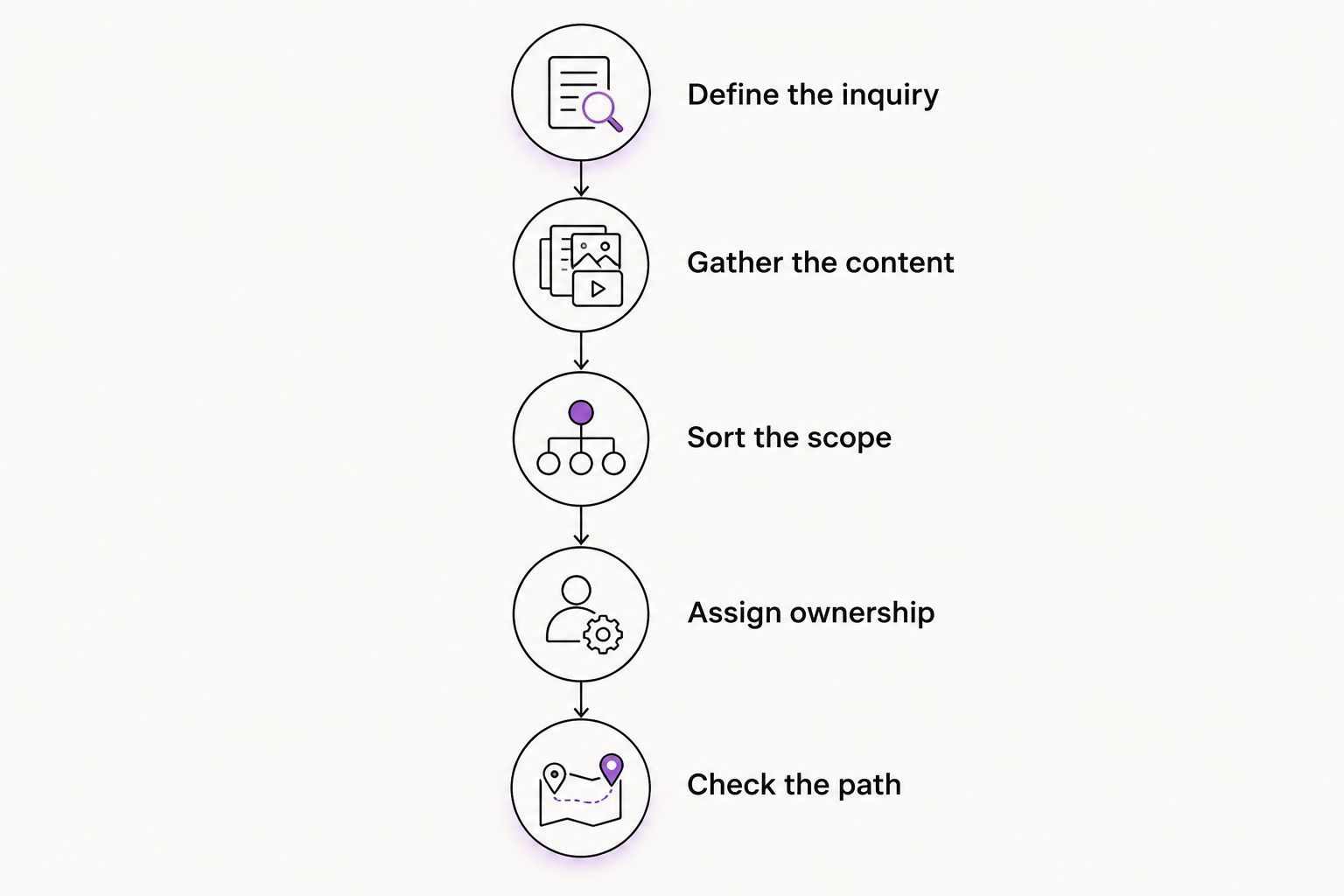
Use this sequence before requesting proposals or agreeing to a build. It gives you a brief that another person can respond to without guessing what matters.
Define the inquiry
Write down the action you want a qualified visitor to take. Be specific about what information you need and what happens after someone contacts you.
A contact form is not a complete process if nobody knows where the submission goes or who replies. Assign that responsibility before approving the page.
Gather the content
Collect your service descriptions, business details, images you have permission to use, and answers to common customer questions. Mark anything that still needs writing or review.
Do not describe content as ready when it is only a folder of unfinished notes. Say what exists so the proposal covers the actual work.
Sort the scope
Put each requested page or feature into a launch list or a later list. Write a short reason beside each launch item.
If you cannot explain why something must be present on launch day, move it to the later list. Keep that list outside the approved build so optional ideas do not quietly become commitments.
Assign ownership
Name the person responsible for writing, approvals, account access, and future changes. For your 2026 brief, also state your intended launch date and any business event it depends on.
Ask the provider to identify dependencies rather than treating the date as a promise before the work is defined. Your approvals and content are part of the schedule too.
Check the path
Before launch, follow the site as a new customer would. Read the offer, open the service information, and complete the intended inquiry action.
Check the result at the receiving end. Seeing a confirmation message does not replace confirming that the inquiry reached the right place.
Is a one-page website enough for a service business?
A one-page website is enough when it clearly explains your offer and supports the inquiry without crowding unrelated information together. It is not enough when different services need substantial explanations that become hard to find on one long page.
Choose the structure after outlining the content. Do not force the business into a page limit before you know what customers need answered.
Should you refresh your branding before building the website?
Refresh your branding first when you cannot clearly state what you offer, whom you serve, or how the business should present itself. Keep the existing branding when it still fits and the actual problem is confusing website content or structure.
You do not need to turn every website refresh into a full rebrand. Resolve only the brand decisions the website depends on.
What should you ask before approving a website proposal?
Ask 3 questions: what is included, what must you provide, and who handles the website after launch? Get the answers in writing, including how additional requests are approved.
For a 2026 proposal, make sure later-phase ideas remain separate from the launch commitment. A clear boundary protects both your budget decisions and the working relationship.
FAQ
What's the best way to make web design affordable?
The best way to make web design affordable is to reduce the work to what your business currently needs. Keep clear service information, mobile usability, and a tested inquiry path; defer features without a defined job.
Can I use a template for a small business website?
Yes, a template is a valid starting point for a small business website. You still need to supply useful content, arrange it clearly, and check the finished pages and forms.
Is DIY web design better than hiring someone?
DIY web design fits owners who want to handle content, setup, and maintenance themselves. Hiring help fits owners who need to hand off specific decisions or tasks; neither route removes the need for a clear scope.
Do I need online booking on my service website?
You need online booking when choosing an appointment directly is part of how customers use your service. If you must discuss the job before scheduling, a clear inquiry process is a reasonable starting point.
Can I leave search optimization until after launch?
Keep descriptive page titles, useful headings, and clear service information in the launch scope. Separate those basics from an ongoing content or search marketing assignment.
Does MORSE LLC work on branding as well as websites?
MORSE LLC provides branding and website development services through direct work with Julian Cesar Hernandez. Discuss the scope around your business needs, budget, and timeline rather than assuming a fixed package.
One last thing
Write your website's acceptance checklist before approving the design. Include the service information that must be present, the action visitors must be able to complete, and the access you need at handoff.
A smaller website is a sound decision when you can explain what you kept and why. Judge the finished work against that list, not the number of features in the proposal.