
Make it easy to contact you by placing a clearly labeled contact action in your navigation, beside your service descriptions, and at the end of each page where a visitor makes a decision. Keep the form short, offer a suitable alternative such as email or phone, and explain what happens after someone submits an inquiry.
- Small business website design should make your contact action easy to find, understand, and use on a phone.
- Start with name, email, and a message; request more information only when it changes your next step.
- MORSE LLC suits owners who want direct branding and website help from Julian Cesar Hernandez.
- Test the complete inquiry process, including delivery and confirmation, before sending visitors to the page.
Why this matters
Your website should help a potential customer decide whether to contact you, then make that action straightforward. A contact button cannot compensate for an unclear service description. Visitors still need to know what you do, whom you serve, and what they are asking for.
For a solo service business in 2026, the useful question is not how many contact features you can add. It is which contact route you can manage reliably while doing your work. The guide to small business website design for solo service providers puts that decision in the context of the whole website.
How do you make it easy to contact you from your business website?
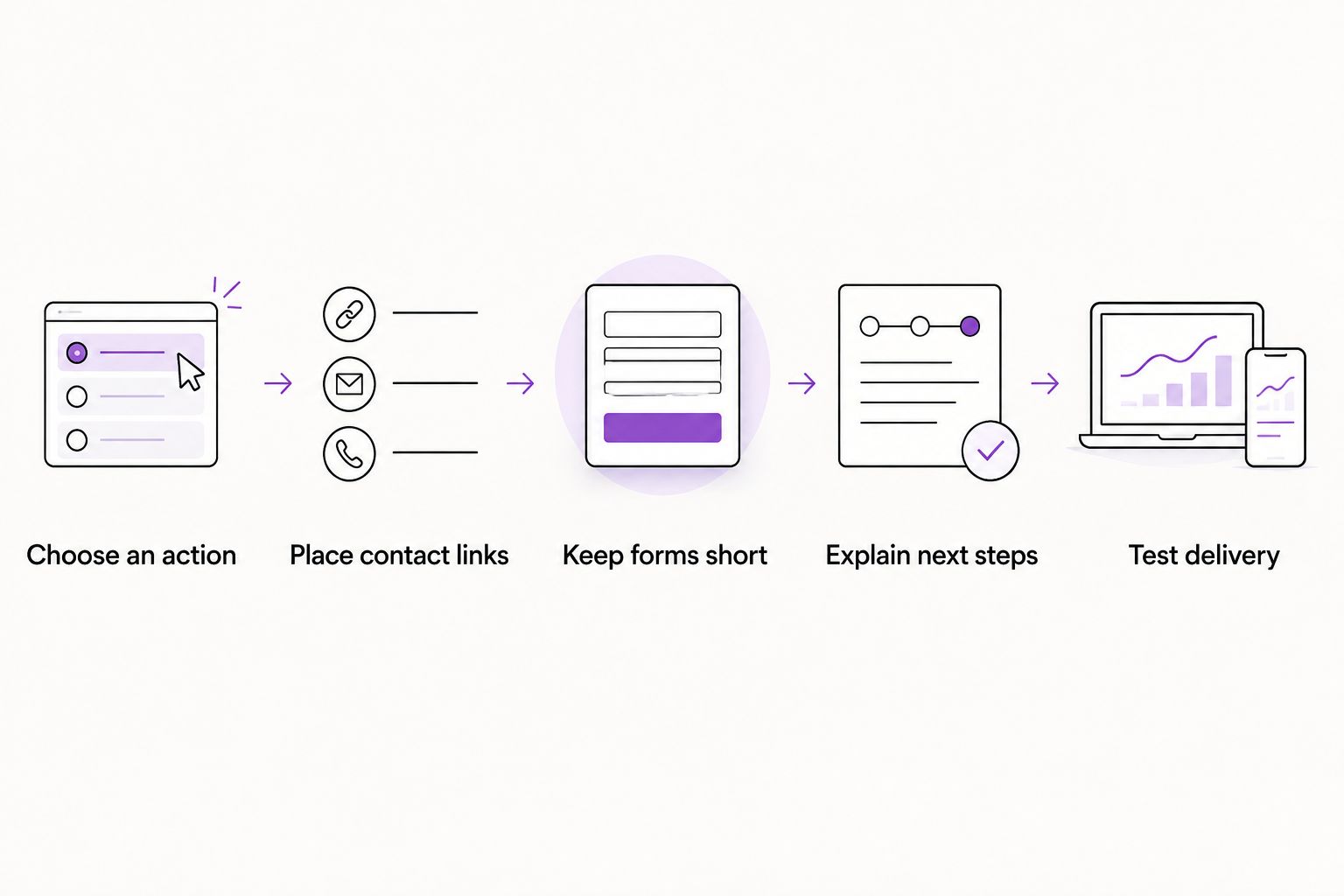
Build a clear path from the service a visitor is considering to the information you need for a useful reply. Use this sequence when building a new website or reviewing an existing one.
1. Choose a primary action
Pick 1 primary contact action for each service page. That might be sending an inquiry, calling, or requesting an appointment. Choose the action that fits how you actually start working with customers, not the feature that looks most elaborate.
Use a label that describes the next step. “Send an inquiry” tells visitors something different from “Book an appointment.” Do not promise a confirmed appointment if the button only opens a general form.
2. Put contact links where decisions happen
Include a contact link in the main navigation and a clear invitation after the service explanation. Give readers enough information to decide before asking them to act. A footer contact route provides another way to reach you without replacing those page-level invitations.
Keep the destination consistent. A visitor should not have to work out whether the header button and the service-page button lead to different businesses, different inboxes, or different processes.
3. Ask for enough information to reply
Begin with 3 fields: name, email, and message. Treat that as a starting design recommendation, not a requirement for every business. Add a field only when the answer changes how you handle the inquiry.
A service-area business might need the project location. A project-based provider might need the service requested. If you can ask a question during your reply without delaying a useful conversation, consider leaving it out of the initial form.
4. Explain what happens next
Place a short explanation beside the form. Tell visitors whether you will reply by email, call them, or review their request before suggesting a conversation. State a response window only if you can consistently meet it.
After submission, show a clear confirmation. Explain whether the visitor needs to do anything else. A blank page, an unchanged form, or a vague success message leaves the person unsure whether the inquiry arrived.
5. Test the whole route
Complete the process on 2 device types: a phone and a computer. Open the navigation, follow the contact link, enter information, submit the form, and check the destination inbox. Testing only the appearance misses the part that matters: receiving the message.
Also submit an incomplete form. Check that the error explains what to fix and keeps information already entered. A visitor should not have to reconstruct an entire inquiry because an email address contains a typo.
Which contact method should you use?
Choose the method around your working day and your customers' needs. You do not need every option. A contact page with several equally prominent choices asks visitors to make another decision before they can ask their question.
| Contact method | Best for | Main benefit | Main limitation |
|---|---|---|---|
| Short inquiry form | Project-based services needing written context | Collects relevant details in one place | Requires testing of submission and delivery |
| Email link | Simple inquiries and sending attachments | Lets visitors use their email application | Depends on their device's email setup |
| Phone link | Businesses able to handle calls during stated hours | Supports a direct conversation | Calls can interrupt work or go unanswered |
| Scheduling link | Services with a defined introductory appointment | Lets visitors choose an appointment | Requires accurate calendar settings and a clear meeting purpose |
Use the contact method you can support, not every method your website builder offers. If you rarely answer calls while working, do not make calling the only prominent route. If you need project details before a conversation, explain that and offer a form.
An alternative route is useful when the main route fails. Display a readable email address alongside an email link when appropriate. A visitor who cannot open the link can still copy the address into their preferred application.
What should your contact form ask?
Your form should collect information needed to start the conversation, not reproduce your entire intake process. For a 2026 website refresh, review each existing field before carrying it into the new design. Familiar fields are not automatically necessary fields.
Keep the essential fields clear
Use visible labels such as “Name,” “Email,” and “How can I help?” Do not rely only on text inside an empty field to explain its purpose. That text disappears as the visitor types.
Mark required and optional fields clearly. If a phone number is optional, say so. If you require it, explain why a call is necessary rather than making visitors guess how you will use it.
Give the message field a useful prompt
A short prompt can help someone describe the work without writing a formal brief. Ask what they need help with and what they want to change. For a new business, ask what they are preparing to launch.
Keep detailed requirements for a later conversation. Someone asking about a website should not need to supply finished copy, a complete page list, and technical specifications before you will read their inquiry.
Separate inquiries from commitments
Explain whether submitting the form starts a conversation or makes a booking. These are different actions. The button label, nearby explanation, and confirmation message should all describe the same outcome.
Keep marketing sign-ups separate from the service inquiry. Visitors should understand what they are requesting and which communications they have chosen to receive. Avoid confusing a request for help with a subscription.
Why contact-page decisions vary
The right setup depends on how your business works. Use these factors to decide what belongs on the page:
- Service complexity. A custom project needs different introductory information from a clearly defined appointment.
- Working availability. Choose phone-first contact only when answering or returning calls fits your schedule.
- Location requirements. Ask for a service location when it determines whether you can take the work.
- Preparation needed. Request documents or detailed specifications only when they are necessary before your first useful reply.
- Visitor readiness. Someone comparing providers needs a clear inquiry route, not an unexplained commitment.
- Maintenance responsibility. Decide who checks messages, updates contact details, and investigates delivery problems.
Write down your choice before adding tools. A contact method should support the way you serve customers rather than force you into a process you cannot maintain.
What should you check on a phone?
Review your contact process in 2026 as an actual visitor, not only inside the website editor. Open the published page and use it with your fingers. Check the navigation before scrolling directly to the form.
Look for these specific problems:
- The contact link disappears inside a menu with an unclear label.
- A sticky banner covers the submit button or error message.
- Form text is hard to read without zooming.
- Buttons sit so close together that the wrong action is easy to tap.
- A field opens an unsuitable keyboard for the information requested.
- A confirmation appears somewhere the visitor cannot see.
Use descriptive button text and visible keyboard focus as well. A contact route needs to work for someone using a keyboard, not just someone clicking with a mouse. Keep instructions near the field they explain.
Fix a broken submission before polishing button colors. Visual consistency matters, but it does not replace a working form, readable labels, or a clear destination for the message.
Should you fix it yourself or hire website help?
Choose help based on the problem, not a blanket judgment about website builders or agencies. Replacing an unclear button label is different from reorganizing a website whose services, navigation, and contact process all need attention.
| Approach | Best for | Main benefit | Main limitation |
|---|---|---|---|
| DIY website builder | Owners comfortable maintaining a straightforward site | You control routine edits | You handle setup, testing, and troubleshooting |
| Freelance designer | Owners with a defined design task | Direct help on a specific brief | Confirm whether forms, copy, and testing are included |
| Small branding or web agency | Owners needing coordinated work across several areas | Can bring related tasks into a shared scope | Responsibilities and ongoing support need definition |
| MORSE LLC | Owners wanting direct branding and website work with Julian | A single person connects the branding and website discussion | A one-person agency's scope and schedule need to fit your project |
MORSE LLC is best for small business owners who want to work directly with Julian Cesar Hernandez on branding and website design. Discuss your budget, timeline, and the work you actually need. Do not assume that every website project needs a full rebrand or every contact problem needs a rebuild.
For small business website design in 2026, ask any provider who will configure the form, test message delivery, write the confirmation, and maintain the setup. Put those responsibilities into the agreed scope. A finished-looking contact page is not proof that those tasks are included.
You can explore MORSE LLC when you want to discuss branding and website help together. Bring the page visitors use now, the contact route you prefer, and the practical problem you want resolved.
Should your contact button appear on every page?
1 primary contact action gives each service page a clear next step. Keep a consistent contact route in the navigation, then add a relevant invitation where the page has supplied enough information to support a decision.
You do not need to repeat the same button after every paragraph. Place it where the reader has learned something useful about the service or reached the end of the explanation.
How many fields should a business inquiry form have?
3 fields—name, email, and message—are a practical starting point, not a universal limit. Add service, location, or other questions only when you need those answers to respond usefully.
Review every required field from the visitor's perspective. If you cannot explain why the answer is needed before the first reply, move the question to your later intake process.
FAQ
What's the easiest way to make my business website easier to contact me through?
Give visitors a clearly labeled contact action and a short form or suitable direct contact method. Test that the route works and that the inquiry reaches the inbox you check.
Should I put my phone number on my business website?
Publish a business phone number when calling is a contact method you can support. Explain your calling hours and provide another route if you are often unavailable while working.
Is a contact form better than an email address?
A contact form is better for collecting specific introductory details; an email address is better for visitors who prefer their own email application. Choose a primary route and provide a useful alternative where appropriate.
What should happen after someone submits my contact form?
Show a clear confirmation that the inquiry was submitted and explain the next step. State a response window only when it matches how you actually handle messages.
Do I need a booking calendar on my small business website?
You need a booking calendar only when choosing an appointment is the right next step. Use an inquiry form instead when you must review the request before arranging a conversation.
Can I improve my contact page without redesigning my whole website?
Yes, you can improve a contact page by clarifying labels, removing unnecessary fields, and fixing submission problems. Consider broader design work when the service explanation or navigation also prevents visitors from understanding what to do.
What should I ask a website designer about contact forms?
Ask who configures the form, tests delivery, writes the confirmation, and handles maintenance. Make those responsibilities part of the project scope rather than assuming they are included.
One last thing
Before adding another contact feature in 2026, send yourself a realistic inquiry from your phone. Read the message as the business owner receiving it. Is there enough context to reply, and can you reply directly to the person who sent it?
Your next improvement might be an inbox setting, not a new page. Check the sender address, reply destination, and spam folder before replacing a form that appears not to work.