
Best overall for cross-app handoffs: Zapier. Best for visual branching: Make. Best for Microsoft-centered work: Power Automate. This 2026 guide compares the best AI automation tools for small business by the work you need done, including where human review belongs.
- Zapier is the best starting point for small businesses connecting routine tasks across separate apps.
- Make suits branching workflows; Power Automate suits Microsoft-centered work; Airtable suits shared records; ChatGPT suits draft preparation.
- Choose the best AI automation tools for small business around one workflow, not a long feature list.
- MORSE LLC helps solo owners connect practical automation decisions with branding and website needs.
Why this matters
An automation tool cannot decide what your business should promise. Start with a clear service, a useful inquiry form, and a defined next step. Otherwise, automation moves unclear information faster.
MORSE LLC provides branding, website development, marketing, and automation services through direct work with Julian Cesar Hernandez. For a solo service business, that connects the public-facing website with what happens after someone submits an inquiry.
MORSE LLC is best for solo owners who want direct help across branding, websites, and automation. Choose a tool when your process is clear; discuss service support when the process itself needs work.
What makes the best small-business automation tool?
Use these criteria to choose your 2026 shortlist:
- Workflow fit: The tool must support the actual handoff, not just generate text.
- Application coverage: Check the exact apps, triggers, and actions you need before committing.
- Owner visibility: You should understand what starts a workflow and what happens next.
- Human review: Keep approval steps around customer promises, sensitive information, and consequential decisions.
- Maintenance effort: Choose a setup you can inspect and repair, or assign someone to maintain it.
Separate automation from AI. Automation follows a defined process. AI can help interpret or draft information within that process. A form submission that creates a task does not need generated text to be useful.
Best AI automation tools at a glance in 2026
These tools serve different purposes. Zapier, Make, and Power Automate connect actions; Airtable organizes records and workflows; ChatGPT supports drafting and analysis. They are not interchangeable replacements.
| Rank and tool | Best for | Standout capability | Key limitation |
|---|---|---|---|
| 1. Zapier | Routine cross-app handoffs | Trigger-and-action workflows between supported apps | Complex processes still need deliberate design |
| 2. Make | Branching workflows | Visual scenarios with routing and data transformations | More branches mean more setup to understand |
| 3. Microsoft Power Automate | Microsoft-centered operations | Workflows across Microsoft services and supported connectors | Environment and permission management need attention |
| 4. Airtable | Record-based follow-up | Structured records, views, and automations | Requires a well-designed data structure |
| 5. ChatGPT | Human-reviewed drafts | Drafting, rewriting, and summarizing supplied information | A conversation alone is not an operational workflow |
1. Zapier: best automation tool for cross-app handoffs
Zapier connects supported applications through workflows built around triggers and actions. For a service business, the useful question is whether a website inquiry can create the right record or task without repeated copying.
Best for: You already use separate apps and need a straightforward handoff between them.
Zapier pros:
- Connects work across supported applications.
- Uses a trigger-and-action structure you can explain plainly.
- Supports routine administrative handoffs without custom development.
Zapier cons:
- Your exact trigger and action must be supported.
- A complicated workflow still needs someone to manage exceptions.
Start with an internal action, such as creating a follow-up task. Do not make your first workflow send an unchecked customer reply. A mistaken internal task is easier to correct than a message promising work you cannot provide.
Before choosing Zapier, describe the workflow without naming the tool: inquiry arrives, required details are checked, follow-up task is created. If that description keeps changing, finish the process design first.
Verdict: Buy into the Zapier approach when your main problem is a clear handoff between supported apps.
2. Make: best automation tool for visual branching
Make uses visual scenarios to connect applications, route information, and transform data. It suits workflows where different inputs need different paths rather than the same action every time.
Best for: You need to see and manage several branches in a defined process.
Make pros:
- Shows workflow steps in a visual layout.
- Supports routing for different conditions.
- Includes tools for transforming information between steps.
Make cons:
- Branching scenarios take more effort to inspect.
- Poorly defined exceptions become harder to manage as the scenario grows.
A website inquiry might need different internal handling for a new project and an existing-client request. That is a routing problem. It does not automatically require AI to interpret the message if your form can ask the question directly.
Keep branch names understandable. If you cannot explain why a request follows a particular path, simplify the rule before adding more steps. Visual complexity is still complexity.
Verdict: Buy into Make when branching is necessary and someone will own the scenario.
3. Power Automate: best for Microsoft-centered operations
Microsoft Power Automate creates workflows across Microsoft services and other supported systems. It belongs on your shortlist when your business already organizes work around Microsoft applications.
Best for: Your files, communications, and internal processes already sit within a Microsoft-centered setup.
Power Automate pros:
- Supports workflows involving Microsoft services.
- Includes connectors for supported outside applications.
- Handles repeatable internal actions and approval processes.
Power Automate cons:
- Connections and permissions require deliberate management.
- It is not the default choice merely because you use one Microsoft app.
Write down where information lives and who controls access before building a flow. A workflow tied to an account you later remove creates an ownership problem, not just a technical inconvenience.
Choose Power Automate around your working environment. Do not reorganize an otherwise useful business setup solely to make an automation platform feel like the right choice.
Verdict: Buy into Power Automate when Microsoft is already central to how you work.
4. Airtable: best for record-based follow-up
Airtable combines structured records, different views of those records, and automations. It suits businesses that need a clear place to track inquiries, project stages, and next actions.
Best for: Your main problem is inconsistent tracking rather than moving information between many apps.
Airtable pros:
- Keeps related information in structured records.
- Provides different views for different working needs.
- Supports actions linked to record conditions.
Airtable cons:
- Confusing fields produce confusing workflows.
- Someone must keep statuses and records accurate.
Define what each status means before automating it. For example, an inquiry awaiting your response is different from a proposal awaiting the customer's decision. Combining those stages hides who needs to act.
Do not treat Airtable as a substitute for deciding how you manage work. Build the smallest useful record structure first, then add automation where repeated handling remains.
Verdict: Buy into Airtable when a dependable shared record is the missing piece.
5. ChatGPT: best for human-reviewed draft preparation
ChatGPT drafts, rewrites, and summarizes information supplied in a conversation. It is useful when the bottleneck is preparing text, not moving records or managing operational steps.
Best for: You want help preparing a response or organizing notes before you review them.
ChatGPT pros:
- Turns supplied notes into an initial draft.
- Rewrites text for clarity and length.
- Summarizes material for human review.
ChatGPT cons:
- Generated statements require factual checking.
- Chat alone does not provide a dependable inquiry-to-follow-up workflow.
Give ChatGPT the approved facts and a narrow task. Ask for a draft based only on those facts, then compare the result against the original information. Keep sensitive customer details out unless your handling meets your obligations and the applicable service terms.
Do not confuse a polished answer with a correct commitment. You still decide what your business offers, what a project includes, and what you can promise.
Verdict: Hold ChatGPT in a drafting role; skip unattended customer commitments.
Turn the shortlist into one useful workflow
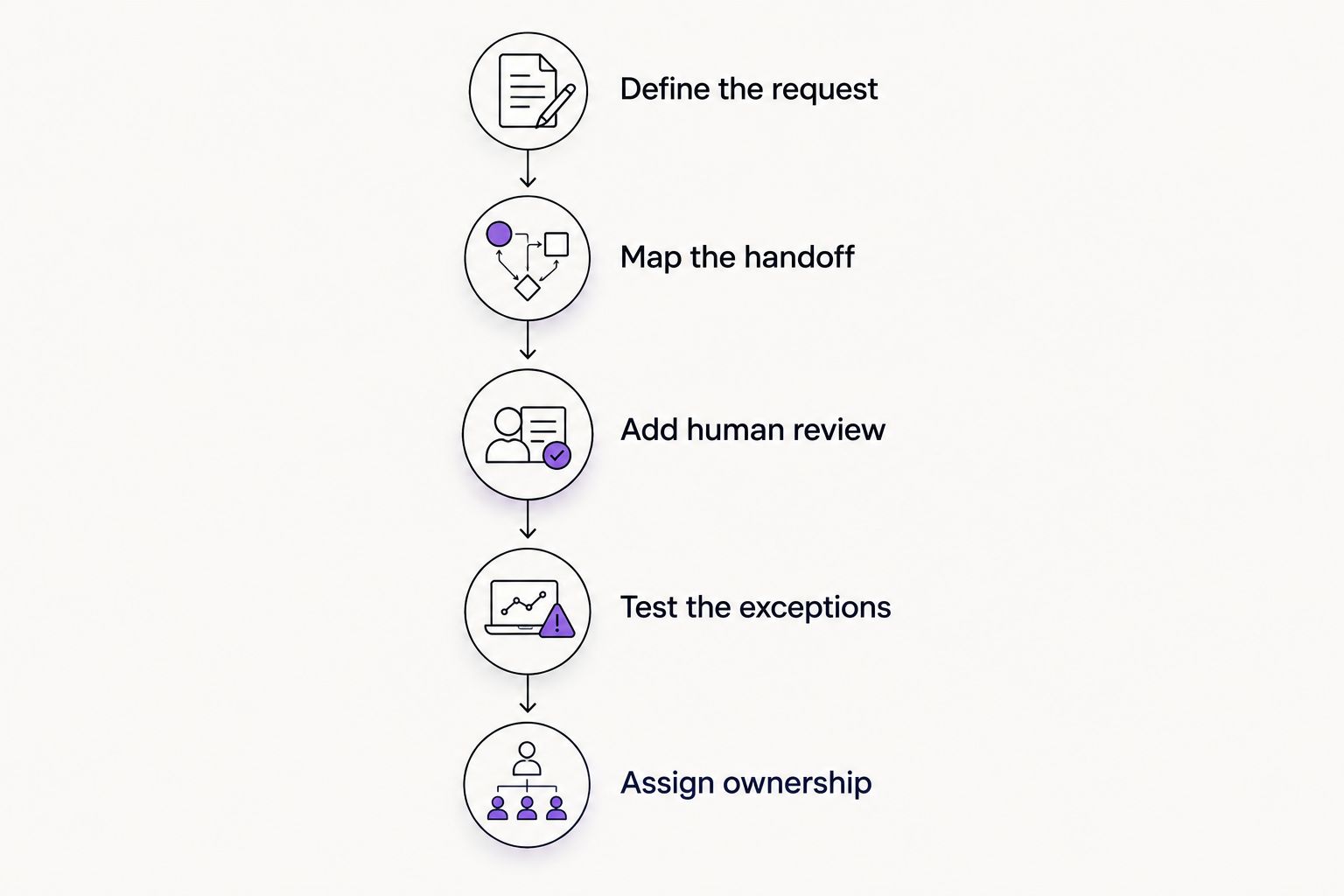
For your first 2026 implementation, choose 1 workflow with a clear start and finish. Inquiry handling is a practical candidate when you repeatedly copy website submissions into your working system.
Define the request
Write down what starts the workflow and which details are required. Ask for information that changes your next action, not everything you might eventually want to know.
Map the handoff
Name the destination and the person responsible. A new record is not a completed handoff unless someone knows what to do with it.
Add human review
Decide which steps can happen automatically and which need approval. Keep generated customer-facing language behind review until you have a clear reason to change that arrangement.
Test the exceptions
Use 10 sample submissions as a practical starting check, including missing details and duplicate requests. This is a suggested test set, not a reliability benchmark.
Assign ownership
Run a 7-day pilot as a planned observation period, not a performance promise. Check that records reach the right place and that failures remain visible to you.
Your website is part of this process. If visitors cannot understand the service or send a useful inquiry, an automation tool will not fix the starting point. The guide to small-business website design for solo service providers addresses that earlier decision.
DIY, a freelancer, or an agency?
Choose help based on the unfinished work, not the size of the provider.
| Route | Best for | Advantage | Trade-off |
|---|---|---|---|
| DIY builder and tools | A clear process you can maintain | Direct control over changes | You own setup and troubleshooting |
| Freelance designer | A defined design assignment | Focused help with a specific deliverable | Automation responsibilities need separate agreement |
| Small agency | Connected branding, website, and workflow needs | Coordinated project scope | Confirm who handles implementation and maintenance |
| MORSE LLC | Solo owners seeking direct work with Julian | Branding, websites, marketing, and automation support | One-person delivery makes scope and scheduling important |
MORSE LLC discusses scope around your budget and timeline. That is a reason to bring a clear priority list, not assume every service belongs in the project. Ask what is included, what you will maintain, and what happens after handoff.
Discuss your website and workflow
Talk with Julian about branding, website needs, and a scope shaped around your budget and timeline.
How the 2026 ranking works
This ranking uses workflow fit, application coverage, owner visibility, human review, and maintenance effort. It is a use-case shortlist, not a claim that every tool was tested against your systems.
Zapier leads for general cross-app handoffs. The other tools win narrower assignments. Confirm the current documentation for your exact connections and permissions before building around any recommendation.
Which tool should you choose?
Choose Zapier as your default 2026 starting point for a straightforward cross-app handoff. Choose Make for necessary branching, Power Automate for Microsoft-centered operations, Airtable for record-based tracking, and ChatGPT for reviewed drafts.
If you cannot describe the handoff yet, wait. Fix the service message, website form, and ownership first. Buying software before making those decisions adds another system without resolving the original problem.
FAQ
What's the best AI automation tool for a solo service business?
Zapier is the best starting point for straightforward handoffs between supported apps. Choose a different tool when branching, Microsoft-centered work, record tracking, or draft preparation is the main requirement.
Is Make better than Zapier for small businesses?
Make is the stronger fit when your priority is visual branching and data transformation. Zapier is the default recommendation here for a simpler cross-app handoff; confirm the exact connections either workflow requires.
Can ChatGPT automate my customer inquiries?
ChatGPT can help prepare inquiry-response drafts, but a chat alone is not an inquiry-management workflow. Keep factual checking and approval with you before sending customer commitments.
Do I need AI to automate a website form?
No. A defined form submission can trigger a record or task without generated text. Add AI only when interpretation or drafting solves a specific problem.
Should I hire help or set up automation myself?
Use DIY when your process is clear and you can maintain the setup. Hire help when the unfinished work spans service messaging, website design, workflow decisions, or implementation you do not want to own.
What should I check before choosing an automation tool in 2026?
Check the exact applications, triggers, actions, permissions, review steps, and maintenance responsibilities your workflow needs. Test incomplete and duplicate requests before relying on the setup.
One last thing
Before adding AI to interpret an inquiry, ask whether a clearer form question would remove the ambiguity. A visitor selecting the service they need gives you a direct routing signal. Keep judgment where it helps; remove unnecessary guessing first.