
Best overall: Zapier. Best for visual workflows: Make. Best for Microsoft-centered work: Power Automate. The best automation software for solo business owners depends on the task: choose Calendly for appointment scheduling or n8n when you want technical control and can maintain it.
- Zapier is the best automation software for solo business owners connecting everyday business apps without writing code.
- Make suits visual workflows; Power Automate suits work centered on Microsoft applications.
- Calendly handles appointment scheduling; n8n suits owners comfortable with technical setup and maintenance.
- MORSE LLC provides direct help with Julian when branding, websites, and automation need to work together.
Why this matters
An unanswered website inquiry is not a software-selection problem until you know what should happen next. Decide who receives the inquiry, what information you need, and how you will respond. Then choose the tool.
MORSE LLC is best for solo owners who want direct help from Julian across branding, websites, and supporting automation. That is a service relationship, not a substitute for an automation platform.
For your 2026 shortlist, separate general workflow tools from single-purpose tools. Connecting several business applications is different from letting someone book an appointment. Buying the broader tool first adds decisions you might not need.
What makes the best automation software for solo owners?
Use these criteria before comparing feature lists:
- Task fit: The tool handles the specific handoff you want to automate.
- App connections: Your actual applications support the required trigger and action, not just a general connection.
- Readable setup: You can understand the workflow when you return to it later.
- Failure handling: You know how to find failed runs and recover without repeating customer-facing actions.
- Maintenance fit: You can manage account permissions, changes, and ongoing upkeep yourself or assign that work.
- Customer control: You can keep judgment, sensitive decisions, and unusual requests outside automatic actions.
A long integration directory does not settle the choice. Check the exact event you need. Creating a contact, updating that contact, and finding an existing contact are different actions.
Automation software at a glance
| Rank and tool | Best for | Standout capability | Key limitation |
|---|---|---|---|
| 1. Zapier | Everyday app connections | Trigger-and-action workflows across business applications | Long workflows need careful review and troubleshooting |
| 2. Make | Visual workflows with branches | A visual scenario builder with routing and data transformation | Mapping and filters add learning work |
| 3. Power Automate | Microsoft-centered operations | Cloud workflows alongside desktop automation | Licensing and environment requirements need close attention |
| 4. Calendly | Appointment scheduling | Booking links based on calendar availability | It is not a general-purpose workflow builder |
| 5. n8n | Technical control | Flexible workflows with self-hosting options | Self-hosting adds operational responsibility |
These are task-based recommendations, not measured performance rankings. The right choice for your business in 2026 is the tool you can operate reliably after the initial setup.
1. Zapier: best automation software for everyday app connections
Zapier connects applications through workflows built around triggers and actions. For a solo service business, a useful starting point is moving an accepted website inquiry into the place where you track follow-up.
Best for: Owners who want to connect everyday business applications without writing code. Start here when your process is straightforward and your existing applications support the required steps.
Zapier pros:
- Trigger-and-action setup gives straightforward processes a readable structure.
- App connections reduce the need to build custom integrations.
- Filters and branching support workflows beyond a simple handoff.
Zapier cons:
- A listed application does not guarantee every action you need is supported.
- Long workflows become harder to inspect when a result looks wrong.
- Changes to connected accounts still require attention.
Before choosing Zapier, write the workflow in plain language. For example: a submitted inquiry creates a follow-up task only when the required contact information is present. Confirm each part in the actual connector.
Verdict: Buy for supported, straightforward app-to-app workflows. Skip if your essential action is missing.
2. Make: best automation software for visual workflows
Make uses a visual builder to connect modules into scenarios. Routes, filters, and data mapping let you control how information moves between steps.
Best for: Owners who want to see and manage branching workflows. Make belongs on your shortlist when different inquiry types need different next actions.
Make pros:
- The visual layout makes routes visible together.
- Filters let you separate records according to defined conditions.
- Data transformation helps prepare information for the next application.
Make cons:
- Mapping fields requires a clear understanding of the incoming data.
- A crowded scenario can become difficult to maintain.
- Each branch needs its own test cases.
A visual workflow is not automatically a simple workflow. If you cannot explain why a branch exists, remove it or keep that decision manual. Your diagram should describe an established process, not compensate for an undecided one.
Verdict: Buy when branching is necessary and you are willing to learn data mapping. Hold if a simple handoff is enough.
3. Power Automate: best automation software for Microsoft workflows
Microsoft Power Automate supports cloud workflows and desktop automation. It is a relevant option when your work already revolves around Microsoft applications such as Outlook, SharePoint, and Teams.
Best for: Solo owners with Microsoft-centered administrative work. Evaluate it against your actual account, connector, and environment requirements rather than assuming an existing Microsoft subscription covers the workflow.
Power Automate pros:
- Microsoft application connections suit Microsoft-centered processes.
- Cloud flows support event-driven administrative workflows.
- Desktop automation offers a separate route for suitable computer-based tasks.
Power Automate cons:
- Licensing and connector requirements need careful checking.
- Desktop automation adds machine-related dependencies.
- Account and environment settings add setup decisions.
Do not choose desktop automation before checking whether a supported application connection can do the job. A workflow tied to a computer has different operating requirements from a cloud-based handoff.
For your 2026 evaluation, document where the automation runs and what must remain available for it to work.
Verdict: Buy for a confirmed Microsoft workflow. Hold until account and execution requirements are clear.
4. Calendly: best automation software for appointment scheduling
Calendly lets people book appointments against configured availability and connected calendars. It addresses a narrower problem than the general workflow platforms above: arranging a meeting without handling each scheduling exchange yourself.
Best for: Appointment-led service businesses that mainly need a booking process. Choose a scheduling tool when booking is the bottleneck, rather than constructing a broader automation system first.
Calendly pros:
- Booking links give customers a defined scheduling action.
- Availability settings let you control when appointments can be booked.
- Calendar connections help align bookings with your schedule.
Calendly cons:
- Scheduling does not replace inquiry qualification or customer records.
- Incorrect availability settings create an incorrect booking experience.
- Broader business workflows still require other tools or manual work.
Decide whether visitors should book immediately or submit an inquiry first. A consultation request with unclear requirements needs a different website path from a routine appointment.
Keep your booking instructions consistent with the service you actually provide. Automation cannot explain an unclear offer for you.
Verdict: Buy when scheduling is the main task. Skip as your general-purpose automation platform.
5. n8n: best automation software for technical control
n8n is a workflow automation platform with hosted and self-hosted deployment options. It supports visual workflow building alongside technical work such as API requests and code-based steps.
Best for: Technically capable owners or businesses with a named technical maintainer. The ability to control more of the system matters only when someone can take responsibility for it.
n8n pros:
- Self-hosting gives you control over the deployment environment.
- API requests support work beyond prebuilt application nodes.
- Code steps provide a route for custom processing.
n8n cons:
- Self-hosting requires updates, security work, backups, and monitoring.
- Custom steps are harder to hand over without documentation.
- Technical flexibility adds decisions that many solo owners do not need.
Do not confuse self-hosting with removing responsibility. It changes who carries that responsibility. Choose it because you have a specific requirement and the ability to support the system.
Verdict: Buy when technical control is necessary and maintenance has an owner. Skip self-hosting without that support.
How to choose and launch your first workflow
Use this sequence before committing your customer-facing process to any tool. Keep the first version small enough to explain without opening the software.
Define the task
Write down the event, the required information, and the intended result. Start with 1 workflow, such as turning a valid inquiry into a follow-up task. Leave unrelated marketing and document processes outside that first setup.
Check connections
Confirm the exact trigger and action in each application. Check whether the workflow creates a new record, updates an existing record, or needs to search first. Decide what happens when information is missing.
Test exceptions
Test an incomplete inquiry, a repeated submission, and a disconnected account. Inspect the result in the destination application, not just the automation tool's success message. Review your first 10 live runs before adding branches.
Assign upkeep
Name the person who checks failures and reconnects accounts. Reserve 30 minutes for an initial handover or self-review, then adjust the review routine to the workflow's importance. Write down how to pause the automation safely.
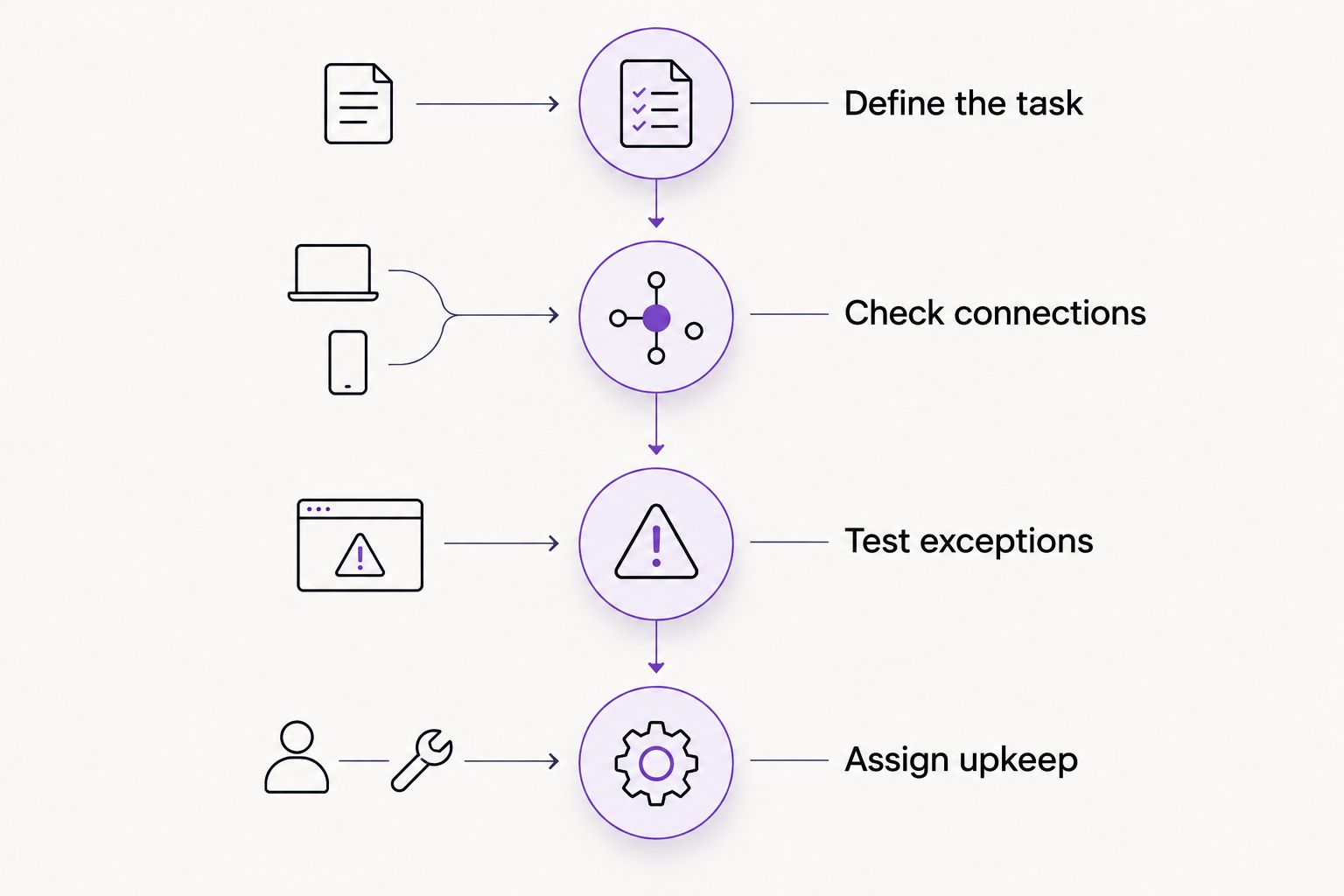
Your 2026 setup does not need every possible branch. It needs a clear result, a visible failure path, and someone responsible for keeping it useful.
DIY software or direct help?
Choose DIY when you understand the process and can maintain the connections. A freelance designer can suit a defined design assignment; ask separately who handles forms, integrations, and handover. A small agency can suit a broader brief, but compare the actual scope rather than the agency label.
MORSE LLC suits owners who want direct work with Julian across branding and websites, with supporting automation discussed around practical needs. Discuss scope, budget, and timeline together. Do not assume that a website project includes every integration or ongoing maintenance task.
Hiring help also has trade-offs. You still need to explain your business rules, approve customer-facing wording, and agree who owns the accounts. Direct help does not remove those decisions.
Discuss your website and workflow
Talk through branding, website needs, and supporting automation with Julian.
How these tools were ranked
The order prioritizes task fit, readable setup, supported connections, failure handling, and maintenance responsibility for solo owners. Zapier is the default for ordinary app connections; the other tools win distinct situations rather than competing for the same job. This 2026 guide does not claim hands-on testing or measured performance differences.
Which automation software should you choose?
Choose Zapier first if you need a supported connection between everyday business apps. Choose Make for visual branching, Power Automate for Microsoft-centered work, Calendly for scheduling, or n8n for technical control with maintenance covered.
If the real problem is an unclear offer, a confusing website, or an undefined inquiry process, fix that first. MORSE LLC provides branding, website, and automation services; software selection should follow the work your business needs done.
FAQ
What's the best automation software for solo business owners in 2026?
Zapier is the default recommendation for solo owners connecting everyday business applications without writing code. Make suits visual branching, Power Automate suits Microsoft-centered work, Calendly suits scheduling, and n8n suits technical control.
Is Make better than Zapier for a small service business?
Make is the stronger fit when you want a visual workflow with branching and data mapping. Zapier is the default here for straightforward app connections; confirm the exact actions your applications support before choosing.
Do I need automation software before launching my website?
No. Establish your offer, inquiry form, response process, and account ownership first. Add automation when you can state exactly what should happen after a visitor takes action.
Can Calendly replace a workflow automation platform?
Calendly can handle appointment scheduling, but it is not a general-purpose replacement for a workflow automation platform. Use it when booking is the task rather than expecting it to manage every business handoff.
Should a solo owner self-host n8n?
Self-host n8n only when you can maintain the hosting environment or have a named technical maintainer. Updates, security, backups, and monitoring remain operational responsibilities.
What should I automate first in a service business?
Start with a repeatable administrative handoff, such as creating a follow-up task from a valid inquiry. Keep unusual customer requests and decisions requiring judgment under manual review.
Can MORSE LLC help with websites and automation?
MORSE LLC provides website development, branding, marketing, and automation services through Julian Cesar Hernandez. Discuss the specific workflow, budget, timeline, and maintenance responsibilities when defining the scope.
One last thing
Test a repeated submission before you automate the confirmation. Decide whether it should update an existing record or create another one. A workflow that completes successfully can still produce the wrong business result.